Sam

This user hasn't shared any biographical information
Homepage: http://samkhanjar.com
Changing QLogic FC HBA firmware configuration using vMA on ESXi
Posted in VMWare on 16 February, 2011
In order to manage an ESX or ESXi host using vMA they will need to be added to vMA first:
sudo vifp addserver <servername>
It would ask you for a username and password which would cache in order to run any future remote scripts.
vifptarget –s <servername>
This would let you target a specific ESX/ESXi host
For the list of available parameters for Qla2xxx and Qla4xxx have a look at (Changing HBA parameters in ESXi).
To apply a single or a set of parameters using vMA, use the following syntax:
Example: vicfg-module –s ‘qlport_down_retry=60 ql2xmaxqdepth=64’ qla2xxx
To display parameters set on an HBA use the command: vicfg-module –g qla2xxx
Make sure you reboot the host after making any changes to take effect.
Note: If you apply a single parameter change at a time it would reset all other parameters to default and only apply the last parameter change to the host.
Host vMotion fails with “source detected that destination failed to resume”
Posted in VMWare on 15 February, 2011
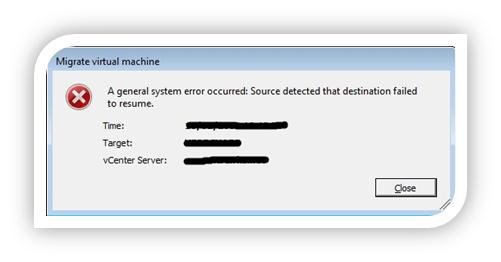 I have searched the internet high and low for some information on this error, the virtual machine fails at 82% during host migration.
No snapshots were attached to the server, however there were a large number of .vmsn files in the root folder. I have had problems backing up that server using vDR because it used to fail on creating the snapshot. Apparently these files are created even though the backup was failing which accumulated over time, files aren’t being marked for deletion.
Going back to vMotion, some of the information recorded on the web is about misconfiguration of VMFS ID’s depending on how you assigned the name to the datastore and how consistent is that name within your virtual environment. ESX assigns a hexadecimal value based on the name you assign to the datastore. For a successful vMotion, each shared datastore should have the same hexadecimal representation on each ESX host and that can be checked by running vdf –h on the console on each host.
The problem was solved by doing a storage vMotion to another shared datastore and then performing host vMotion which worked successfully. There is another way which entails disconnecting the shared datastore and re-mapping it again. I haven’t tried this myself by it worked for some people with similar issue. The latter will cause some downtime since you have to disconnect the LUN and reconnect it again which means shutting down all your effected VM’s.
First look at RVTools
Posted in VMWare on 4 February, 2011
As stated on the RVTOOL Site, it is a Windows .Net application which interacts with your virtual environment using the latest VI SDK to gather health and resource information about each of the ESX hosts and virtual machines. You can either connect directly to an ESX host or call out your environment via vCentre.
I have come across this tool while trying to find an easy way to examine and release a CD or Floppy Disk if mounted to any of the virtual machines, but this is only few of the many uses for this tool. The new version allows passthrough authentication, so you can use your domain username and password to login and use the tool. It also provides some new command line options.
I would recommend having a look at this tool.
My Blackberry isn’t working!
Posted in Uncategorized on 31 January, 2011
It reminds me of my day at work!
Unable to apply DRS resource settings on host
Posted in VMWare on 7 January, 2011
 I noticed this error message appearing on one of my ESX hosts, I had an issue that day and I had to manage it directly using vSphere client.
The answer is simple, ssh to the ESX host and run the command service-mgmt-vmware restart, that resolved my issue.
Cannot create a quiesced snapshot because the create snapshot operation exceeded the time limit for holding off I/O in the frozen virtual machine.
Posted in VMWare on 7 December, 2010
That was a persistent error every time the Vmware Data Recovery appliance tries to take a snapshot of the server for backup.
I had to make sure VSS provider exists by running vssadmin list providers on the effected server, also listening all VSS writers and making sure none of them is reporting an error (by running the command vssadmin list writers)
Make sure MS VSS service set to start manually and the COM+ System Application set to start automatically and it is running.
If the above doesn’t resolve the issue, re-install Vmware tools on the server to re-register VSS.
Error modifying a Template created prior to ESX upgrade from 4 to 4.1
Posted in VMWare on 3 September, 2010
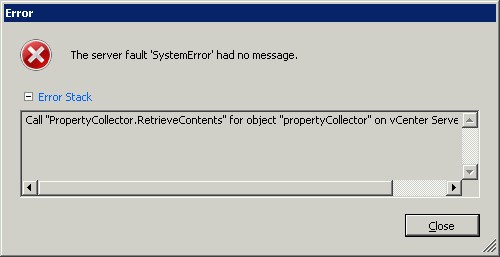 I have had no issues with modifying templates within our VMWare environment until our upgrade to ESX 4.1. Since then all our templates errored with:
“Call “PropertyCollector.RetrieveContents” for object “propertyCollector” on vCenter Server “VCentreServer” failed.”
A simple step to correct the issue would be to delete the template from Inventory and re-add it again. This should clear this message and give you back the control of your template.
Unable to access file since it is locked by System
Posted in VMWare on 23 August, 2010
This has happened few times with one of our Vmware Data Recovery appliances running on VSphere. I have shut down the appliance, as it became unresponsive while still performing a backup of some VM’s into a Windows share.
After forcing the shutdown, the appliance wouldn’t power on again, I kept getting the message “Unable to access file <unspecified filename> since it is locked by System“. I searched long and hard, people were talking about rebooting the ESX host.
I found a simpler solution, if you have forced the shutdown of the vDR appliance, some of the VM’s harddisks would still be attached to the appliance and this could be checked and confirmed by editing the setting on the vDR within vSphere client. Normally vDR has only one harddisk attached to it unless you have mounted more harddisks for backup purposes. By removing these extra harddisks from the vDR, the appliance would power on again.
That same error would occur if you are trying to delete a snapshot attached to a VM while vmdk file(s) of that VM is mounted to a vDR. Removing the mounted volumes from vDR would release the handle on those disks and enable you to delete the snapshot successfully.
Updating vMA
Posted in VMWare on 5 July, 2010
VMware release patches and updates for VSphere Management Assistant appliance, in order to apply those updates:
# sudo vma-update scan
# sudo vma-update update
Migrating standard VMware switch network to a distributed switch
Posted in VMWare on 30 June, 2010
We have recently upgraded our VMware VSphere license structure to Enterprise Plus, we had to plan carefully our migration process without disrupting any of our live services. The migration was very easy especially if at least one redundant physical nic exist on each of the ESX hosts.
Each of the Service Console and VMkerenel ports can be migrated on each host through the Configuration tab > Networking > Distributed Virtual Switch. Manage Virtual Adapters > Add > Migrate existing virtual network adapters, you will need to make sure you have a dv port group already setup before you attempt the migration. ESX will not be shown as disconnected even if your Vswitch had one physical interface. Manage Virtual Adapters > Add > Migrate existing virtual network adapters, you will need to make sure you have a dv port group already setup before you attempt the migration. ESX will not be shown as disconnected even if your Vswitch had one physical interface.
 Sam Khanjar