Posts Tagged Terraform
Automating RBAC Role Assignments with Azure Policy and Terraform

Role-Based Access Control (RBAC) stands as a critical security feature within the Microsoft Azure platform, affording administrators the ability to efficiently manage access to Azure resources. RBAC enables organizations to exercise control over resource-specific actions by assigning roles to users. Yet, manually managing RBAC assignments in large-scale environments can prove burdensome. In this blog post, we will explore the automation of RBAC role assignments based on resource tags by leveraging Azure Policy and Terraform.
Prerequisites:
Before delving into the automation process, please ensure you have met the following prerequisites:
- An active Azure subscription.
- The Azure Command-Line Interface (CLI) installed.
- Terraform installed and properly configured on your local machine.
Azure Policy Schema:
We will commence with the following schema as a basis for our policy:
resource "azurerm_policy_definition" "tag_based_role_assignment" {
  name         = "tag-based-role-definition"
  display_name = "Tag-based Role Definition"
  description  = "Assign RBAC role based on specific tag"

  policy_type = "Custom"
  mode        = "All"

  metadata = <<METADATA
 {
   "category": "RBAC"
 }
 METADATA

 policy_rule = {}
}
The “if” block within the policy_rule{} contains two or three sub-blocks, depending on the policy’s effect. In this instance, we are using the “AuditIfNotExists” effect, necessitating only the “if” and “then” blocks. The condition checks against specific tags under a resource group and is expressed as follows:
{
    "if": {
      "allOf": [{
						"field": "type",
						"equals": "Microsoft.Resources/subscriptions/resourceGroups"
					}, 	{
						"field": "name",
						"like": "rg-sk*"
					}, {
						"field": "tags['Environment']",
						"equals": "Prod"
					}
				]
    }
The above code uses the “allOf” logical operator, evaluating each field’s conditions. In this context:
- We verify the type against “Microsoft.Resources/subscriptions/resourceGroups.”
- We check for a resource group whose name begins with “rg-sk.”
- We ensure the presence of a “Environment” tag with the value “Prod.”
Only when all three conditions are met will the “then” effect be triggered, as discussed next.
The “then” block is of utmost importance, defining the effect and action to achieve compliance:
"then": {
      "effect": "AuditIfNotExists",
      "details": {
        "type": "Microsoft.Authorization/roleAssignments",
        "name": "Tag-based role assignment",
        "roleDefinitionIds": [
          "/providers/microsoft.authorization/roleDefinitions/18d7d88d-d35e-4fb5-a5c3-7773c20a72d9"
        ],
        "existenceCondition": {
          "allOf": [{
                  "field": "Microsoft.Authorization/roleAssignments/roleDefinitionId",
                  "equals": "/subscriptions/<subbscuription_id>/providers/Microsoft.Authorization/roleDefinitions/b24988ac-6180-42a0-ab88-20f7382dd24c"
                }, {
                  "field": "Microsoft.Authorization/roleAssignments/principalId",
                  "equals": "<Azure AD Group principal id>"
                }
              ]
        }
The “effect” is set to “AuditIfNotExists,” resulting in resource state logging when it deviates from the values specified in the “if” block. This enables effective auditing of compliance against custom policies. Additional information about effects and their use in different environments can be found on the Microsoft Learn site.
The “details” block includes crucial elements for verification or remediation. Notably, “roleDefinitionIds” grants the Policy permissions on the Azure resource to facilitate applicable changes. For instance, we utilize the “User Access Administrator” role in our scenario, adhering to the principle of least privileged access.
The “existenceCondition” sets the compliance condition. In this case, we use “allOf” to ensure multiple values are applied. These values include an RBAC role (such as “Contributor“) assigned to the principal ID of an Azure AD group.
Having discussed the auditing aspect (“AuditIfNotExists“), let’s explore extending the example to include remediation through “DeployIfNotExists.” This approach offers a powerful means of achieving compliance. In such a scenario, an additional “deployment” block is required, containing the Azure Resource Manager (JSON) template for implementing the change:
"deployment": {
          "properties": {
            "mode": "incremental",
            "template": {
              "$schema": "https://schema.management.azure.com/schemas/2015-01-01/deploymentTemplate.json#",
              "contentVersion": "1.0.0.0",
              "resources": [
                    {
                        "type": "Microsoft.Authorization/roleAssignments",
                        "apiVersion": "2022-04-01",
                        "name": "[guid(resourceGroup().id)]",
                        "properties": {
                            "roleDefinitionId": "[concat('/subscriptions/', subscription().subscriptionId, '/providers/Microsoft.Authorization/roleDefinitions/', 'b24988ac-6180-42a0-ab88-20f7382dd24c')]",
                            "principalId": "<Azure AD Group principal ID>"
                        }
                    }
              ]
            }
          }
        }
To consolidate everything, here is the complete custom policy code placed within the main.tf file:
resource "azurerm_policy_definition" "tag_based_role_assignment" {
  name         = "tag-based-role-assignment"
  display_name = "Tag-based Role Assignment"
  description  = "Assign RBAC role based on specific tag"

  policy_type = "Custom"
  mode        = "All"

  metadata = <<METADATA
{
  "category": "RBAC"
}
METADATA

  policy_rule = <<POLICY_RULE
  {
    "if": {
      "allOf": [{
						"field": "type",
						"equals": "Microsoft.Resources/subscriptions/resourceGroups"
					}, 	{
						"field": "name",
						"like": "rg-sk*"
					}, {
						"field": "tags['Environment']",
						"equals": "Prod"
					}
				]
    },
    "then": {
      "effect": "DeployIfNotExists",
      "details": {
        "type": "Microsoft.Authorization/roleAssignments",
        "name": "Tag-based role assignment",
        "roleDefinitionIds": [
          "/providers/microsoft.authorization/roleDefinitions/18d7d88d-d35e-4fb5-a5c3-7773c20a72d9"
        ],
        "existenceCondition": {
          "allOf": [{
                  "field": "Microsoft.Authorization/roleAssignments/roleDefinitionId",
                  "equals": "/subscriptions/<subscription id>/providers/Microsoft.Authorization/roleDefinitions/b24988ac-6180-42a0-ab88-20f7382dd24c"
                }, {
                  "field": "Microsoft.Authorization/roleAssignments/principalId",
                  "equals": "<Azure AD Group principal ID>"
                }
              ]
        },
        "deployment": {
          "properties": {
            "mode": "incremental",
            "template": {
              "$schema": "https://schema.management.azure.com/schemas/2015-01-01/deploymentTemplate.json#",
              "contentVersion": "1.0.0.0",
              "resources": [
                    {
                        "type": "Microsoft.Authorization/roleAssignments",
                        "apiVersion": "2022-04-01",
                        "name": "[guid(resourceGroup().id)]",
                        "properties": {
                            "roleDefinitionId": "[concat('/subscriptions/', subscription().subscriptionId, '/providers/Microsoft.Authorization/roleDefinitions/', 'b24988ac-6180-42a0-ab88-20f7382dd24c')]",
                            "principalId": "<Azure AD Group principal ID>"
                        }
                    }
              ]
            }
          }
        }
      }
    }
}
POLICY_RULE
}
Finally, to apply the policy at the appropriate subscription and enable remediation, use the following code:
resource "azurerm_subscription_policy_assignment" "tag_based_role_assignment" {
  name                 = "tag-based-role-assignment"
  subscription_id      = var.scope //this is your subscription id
  policy_definition_id = azurerm_policy_definition.tag_based_role_assignment.id
  location = "West Europe"
  identity {
    type         = "SystemAssigned" //the assignment will need to have an identity (system or used managed) which can be used to assign the User Access Administrator RBAC role.
  }
}

resource "azurerm_subscription_policy_remediation" "rbac_remediation" {
  name = "tag-based-role-remediation"
  subscription_id = var.scope //this is your subscription id
  policy_assignment_id =  azurerm_subscription_policy_assignment.tag_based_role_assignment.id
}
After applying the code successfully, the output on the Azure portal should look something like this:
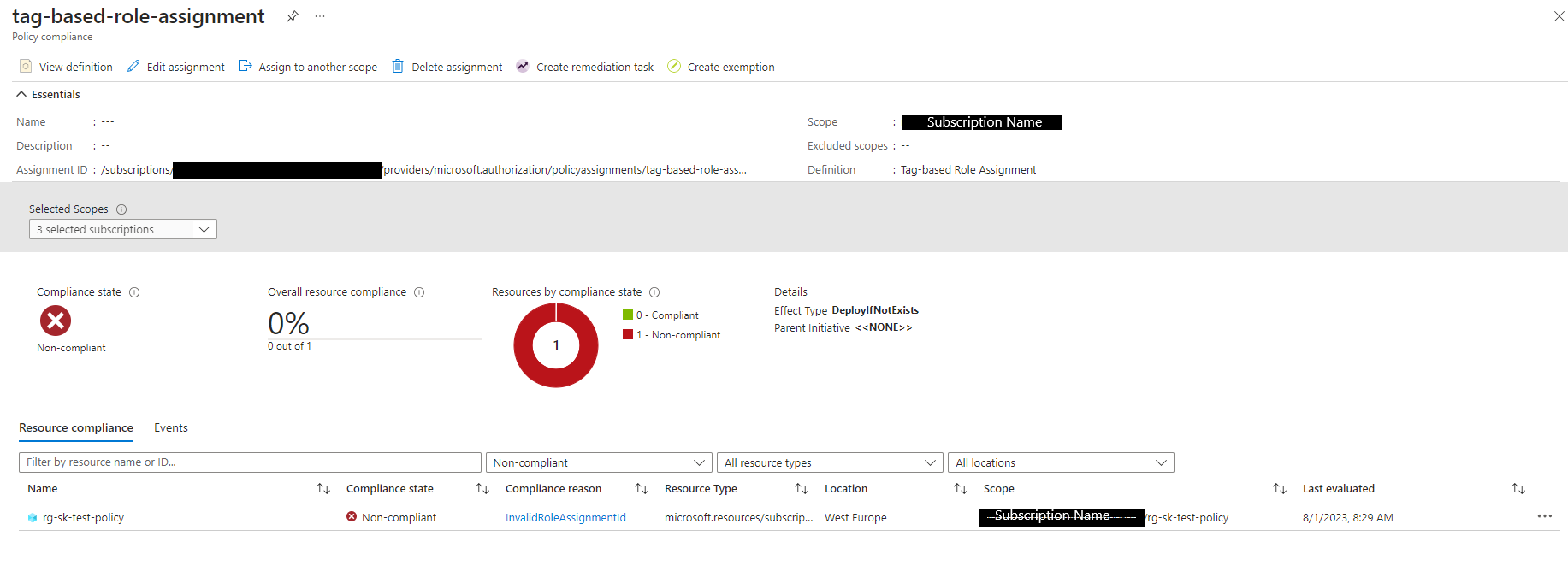
Sometimes this output doesnt take effect straight away, Azure policy evaluation runs every 24 hours but can be enforced using the following command targeting at a single resource group:
az policy state trigger-scan -g "<resource-group-name>"Or you can run the policy trigger without a scope which would evaluate all resource groups in its path.
Automating RBAC role assignments in Microsoft Azure is critical for upholding security and governance in your cloud environment. By leveraging Azure Policy and Terraform, you can effortlessly enforce RBAC roles based on specific tags, ensuring appropriate access control for resources.
Throughout this blog post, we have outlined the process of creating a custom Azure Policy definition and implementing it using Terraform. By following these steps, you can streamline the management of RBAC role assignments and maintain a secure and well-organized Azure infrastructure. Happy automating!
ARM Templates vs Terraform

We get asked why do we use one over the other, I see a lot of discussions made around this topic. I can say there is no definitive answer, it all depends on your internal strategy and human capabilities.
So, I hear you say, are there capabilities that puts one ahead of the other?
Azure Resource Manager (ARM) vs. Terraform templates:
- ARM is a declarative language as in it submits the entire “goal state” to ARM for deployment – but doesn’t store a state of your infrastructure deployment like Terraform does
- ARM template syntax is specific to Azure – not portable – Resources can be deployed to AWS, GCP and Azure alike using Terraform
- Azure resources released in ARM template first – Terraform catches on later
- Terraform plan checks the deployment behaviour before it deploys and displays any changes before it actually happen – ARM can wipe out infrastructure as quickly as it can create them – what I want to say here – have change control in place to avoid this happening to you :)
- Some people find Terraform easier to read and digest especially if those templates are moved between developers – Terraform gives you the flexibility of adding comments while this isn’t available in ARM
- Both languages lets you embed custom scripts (i.e. in other languages such as Bash, Powershell etc.) in your templates which gives Terraform the advantage when a resource API provider is not yet available in Terraform
- Terraform runs pre-flight checks which means you can avoid failed deployments – ARM doesn’t warn you and your deployment might fail half way through deployment
This is my unbiased take on the matter … at the end of the day a clear business strategy should drive those concerns around deployment language and pattern. DevOps mindset has changed, people need to adapt as technologies change and evolve.
 Sam Khanjar